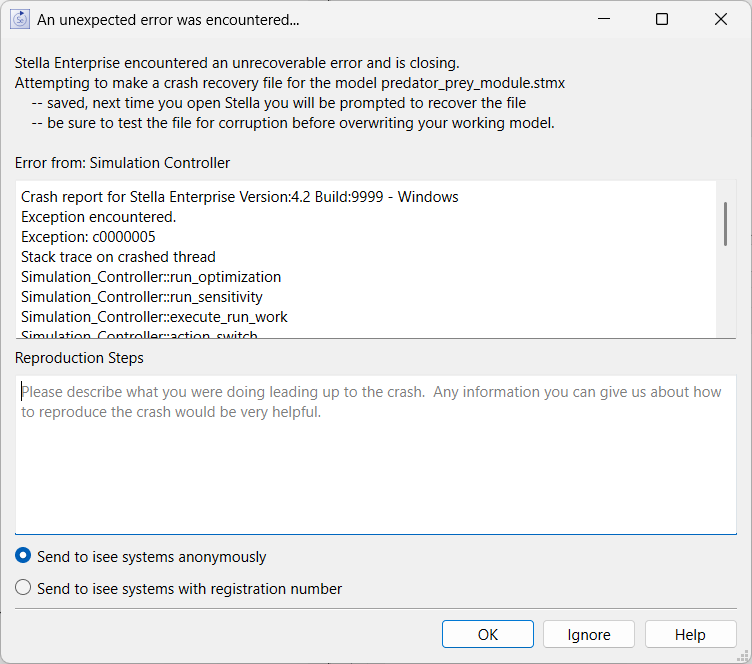
The Unexpected Error dialog appear when Stella encounters an error that it can't recover from, including running out of memory. Rather that simply exiting Stella first attempts to make a recovery save for all open models.
After making the recovery saves Stella will attempt to put up the dialog:
The top text in the dialog tells you the status of crash recovery files. If you have multiple files open there may be multiple messages. They will say one of three things:
In cases 2 and 3 the next time you open Stella the Crash Recovery dialog will open and allow you to view the contents of the automatically saved files.
This line tells you what part of Stella caused the error. Because Stella is running in multiple threads operating on the content at the same time this information is helpful for isee systems in understanding the source of the error.
This shows the Stella (and operating system) function calls that lead to the error. This is helpful in tracking down the sources of error.
If you can provide a sentence or two describing what you were doing when the error occurred it will be most helpful. For example "I just added an element to a dimension" or "I just unchecked the Apply to All checkbox for an arrayed graphical." Such descriptions will help us understand more clearly what might be triggering errors. This information will be sent to our website when you click OK.
If you want to send the error report and let us know it was you select this option. This can be helpful if you contact support via email and want us to look up the crash report.
Clicking on this will send the contents of this dialog to our server where they will be recorded so we can look at them. No additional information will be sent beyond what you have typed in under reproduction steps. If you think the issue is related to a specific model, and you can share that model, emailing it to support will help us track down the issue causing the crash.
Clicking on this will close the dialog and delete the information without sending it anywhere.
Will open this help topic.
Note After an unexpected error it may not be possible to display this dialog and the software may simply close. In this case, assuming Stella was able to create a crash report, this dialog will open the next time you start the software.
Note Crash recovery files are made after the error information has been recorded, but before it is displayed. If attempting a save generates an error there may be additional information in the dialog related to that.